

























HomeHome
BoinxTV Hero

System Requirements

BoinxTV requires either an Intel-based Mac with discrete graphics from ATI or NVIDIA or the latest PowerMac G5 with a ATI graphics and a minimum of 2GB of RAM. BoinxTV runs on all current notebook and desktop Macs (including the MacBook with NVIDIA GeForce 9400M) with the exception of the Macs with integrated Intel GMA graphics (old Mac mini and the white and black MacBook).

A multi-camera setup needs multi-core hardware and a fast graphic card. A Mac Pro with a ATI Radeon HD 3870 graphic card and additional FireWire PCI cards is a good choice for BoinxTV.

At the time of release ATI graphics card greatly outperform NVIDIA chipsets due to a combination of the current state of drivers and the underlying used Quartz Composer technologies.

On the software side BoinxTV requires Mac OS X Leopard (10.5.7 or higher), the latest version of QuickTime (7.5.5 or higher). In addition Apple Intermediate Codec that is installed as part of iLife '05 and newer or one of the Apple Pro software packages is strongly recommended.

Since version 1.4 BoinxTV fully supports Mac OS X 10.6 Snow Leopard with huge performance gains. Upgrading to Snow Leopard is strongly recommended for all users of BoinxTV 1.4 (or higher) as soon as the drivers for their hardware components such as video input cards or audio interfaces have been updated to Snow Leopard compatible versions. Future versions of BoinxTV will require Mac OS X Snow Leopard.

Recommendations

If you thought that your current Mac is fast enough, think twice. BoinxTV likes fast hardware, and with a complex layer and multi-camera setup, performance is in high demand. BoinxTV scales with faster graphics and multi-core CPUs.

Different workflows have different requirements. A multi-camera setup for example needs multi-core hardware and a fast graphic card. We recommend for the following usage scenarios:

Use the built-in iSight and simple graphics to create movies for YouTube.
640 × 480, 15 fps, simple layers
→ Requires Intel iMac or latest MacBook

Use a DV cam and more complex graphics, including greenscreen.
854 × 480 (widescreen), 30 fps, layers with medium complexity
→ Requires MacBook Pro, fast Intel iMac

Use multiple cameras and complex graphics, including greenscreen.
960 × 540, 30 fps, complex layers
→ Requires Mac Pro with ATI HD 3870 graphic card

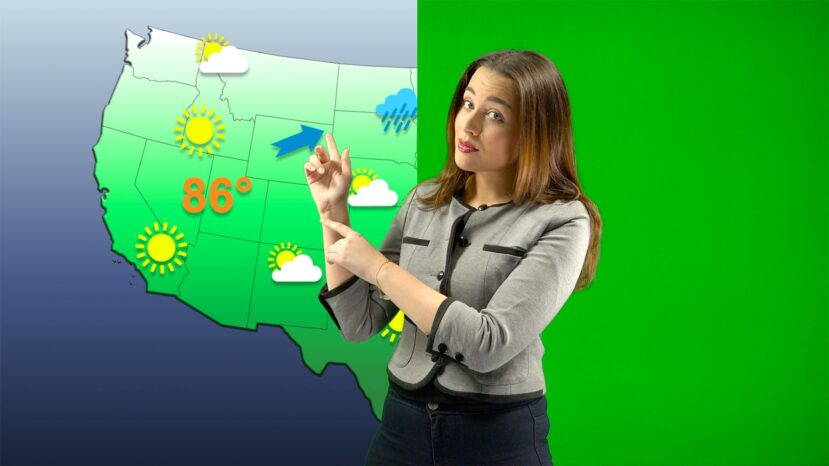
Chroma Key

  • Substitute the studio background with a movie, image or a camera input.
  • Sophisticated chroma keying with green or blue screen or any other color.
  • Artificial shadow suggests depth.
  • Support for “Veescope Key’s Softlyght keyer for BoinxTV"
Chroma Keying

Video Input

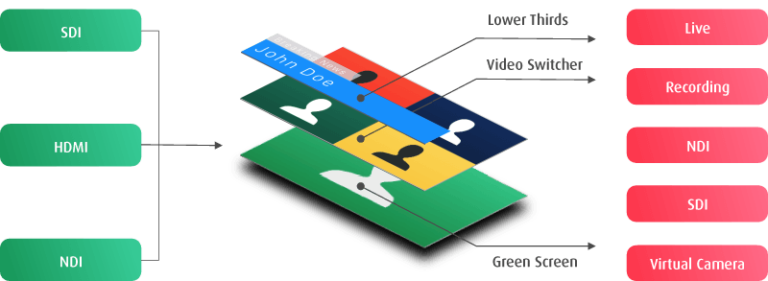
  • Use QuickTime compatible video sources such as DV cameras with FireWire (sometimes called i.Link or IEEE1394), HDV cameras (if they support progressive mode), HDMI cameras (with HDMI interface card such as Blackmagic Design Intensity), iSight camera, USB webcams (if supplied with QuickTime driver) and many more.
  • Screen grabbing to include video chats (Skype, iChat) and presentation slides (PowerPoint, Keynote).
  • Apply core video filters to any video source to create amazing effects.
  • Play back any (unprotected) QuickTime movie.

Audio Input

  • Use any audio device available in your system.
  • Integrate with Soundflower and other audio routing utilities for audio interviews with Skype, iChat and others.
  • Adjust volume for each layer separetely.

Output

  • Record directly to disk as QuickTime file.
  • Play out simultaneously over second screen connector.
  • Convert to Internet stream using external converter or 3rd party software. (not included)
  • Convert to SDI using external converter (not included)
  • Submit to Apple Podcast Producer automatically after recording.
  • Execute an AppleScript after recording.

Layers

BoinxTV ships with more than 50 layers. And you can make your own too!


MacOSX Universal 50px Apple Design Award 2009
In Cooperation with TheCodingMonkeys


Copyright © 2010 Boinx Software Ltd. All rights reserved.